An AI Service Desk Backed by Code

Good support starts with answers grounded in how the product actually works. Giving an AI service desk access to the codebase alongside the documentation lets it investigate implementation details directly and respond with current, project-specific context.
OneDev already lets AI users work inside issues and pull requests, using the codebase as their primary context. It also has a customer service desk that turns support emails into tickets. Combine the two, and questions arriving by email or opened directly in OneDev can be routed to an AI user that inspects the code before answering.
Two Features That Fit Together
The service desk lets customers get help without a OneDev account. They send an email, OneDev creates a ticket in the right project, and the rest of the conversation continues by email. The customer never has to log in.
AI users let you route work to a virtual teammate. When you assign an issue to one, it uses a coding agent such as Claude Code or Codex to inspect the codebase and handle the task.
The connection is simple: route support requests to an AI user, regardless of how they are submitted. A customer can send a request from an email client to the project's service desk address, or submit it directly from the OneDev UI. In either case, the AI user reads the code and documentation, posts an answer, and continues the conversation in the same thread.
The Email Path
Every OneDev project with service desk enabled gets an email address. It can use OneDev's default plus-addressing format or a configured email alias. Customers send their questions there just as they would email any support address.
In the service desk's issue creation settings, you define the fields for each new ticket, including its assignee. Choose an AI user, and OneDev automates the entire flow:
- Email: A customer writes to the project's service desk address.
- Ticket: OneDev reads the message, creates a ticket, and assigns it to the AI user.
- Answer: The AI user opens a workspace, inspects the codebase with a coding agent, and posts a response.
- Reply: OneDev emails the response to the customer.
The In-App Path, Routed by Issue Type
Not every request arrives by email, and not every issue should go to an AI user. You may want it to handle support questions while a human triages everything else.
OneDev ships with a Support Request issue type by default. The code.onedev.io installation renamed this type to Question, which is why that label appears in the live examples and screenshots below.
Use default assignees to route issues by type. Configure the Assignee field to evaluate a Groovy script as its default value:
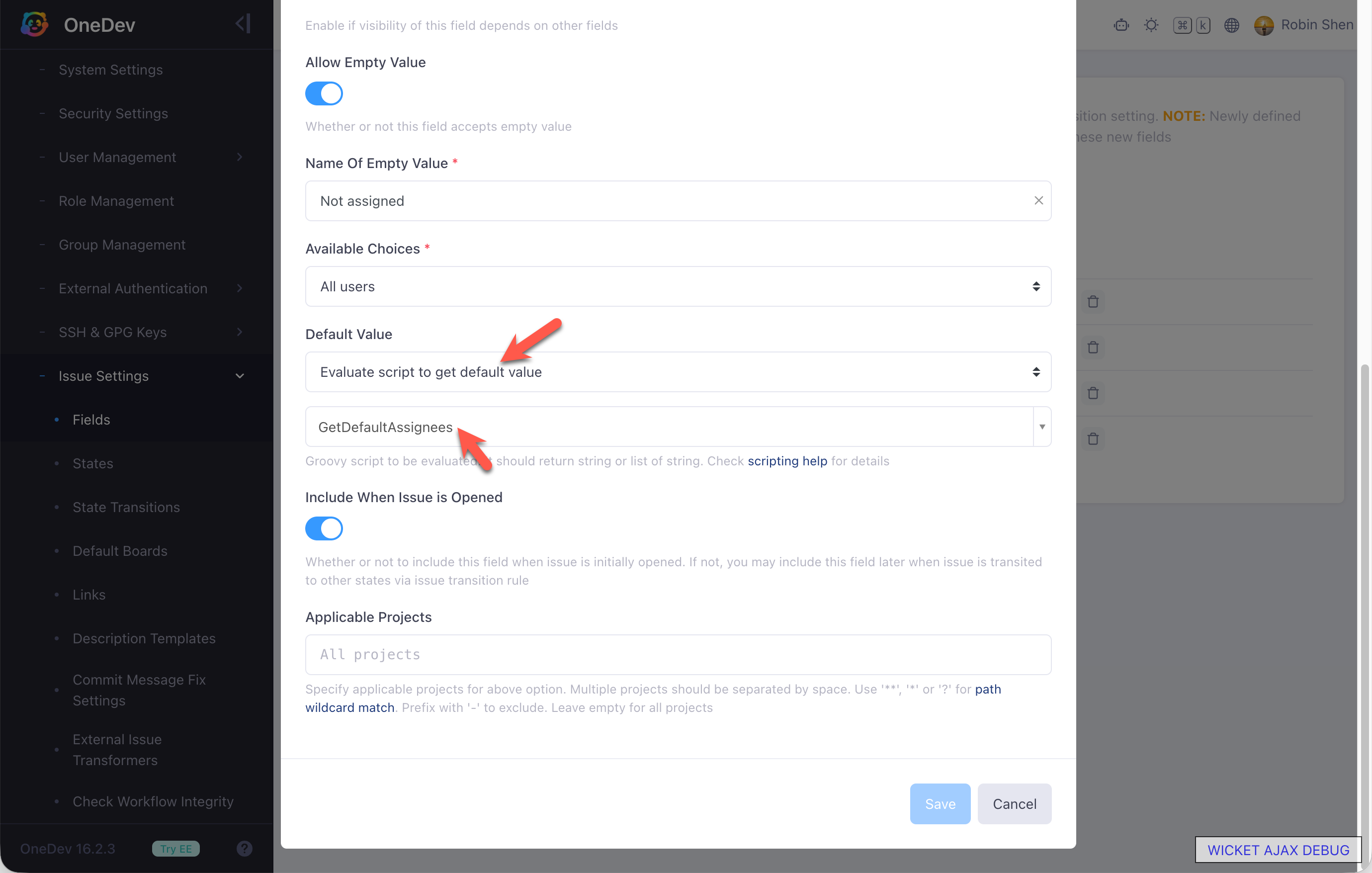
The script inspects the Type field and decides who to assign to:
import io.onedev.server.util.EditContext

def type = EditContext.get().getInputValue("Type") // Check the "Type" custom issue field

if (type == "Support Request")
    return "servicedesk" // login name of an AI user
else
    return "robin" // login name of another user
With this rule, new Support Request issues go to the AI user while other issues go to a human. Adjust the conditions and login names to match your own triage policy. Whether a request starts in email or in OneDev, the same AI user reads the code and responds.
Shaping the Support Persona
A general-purpose AI user is not automatically a good support agent. It should answer questions instead of changing code, stay within a defined scope, and know when to hand off to a human. Configure these boundaries from the AI user's AI Settings → Behavior tab.
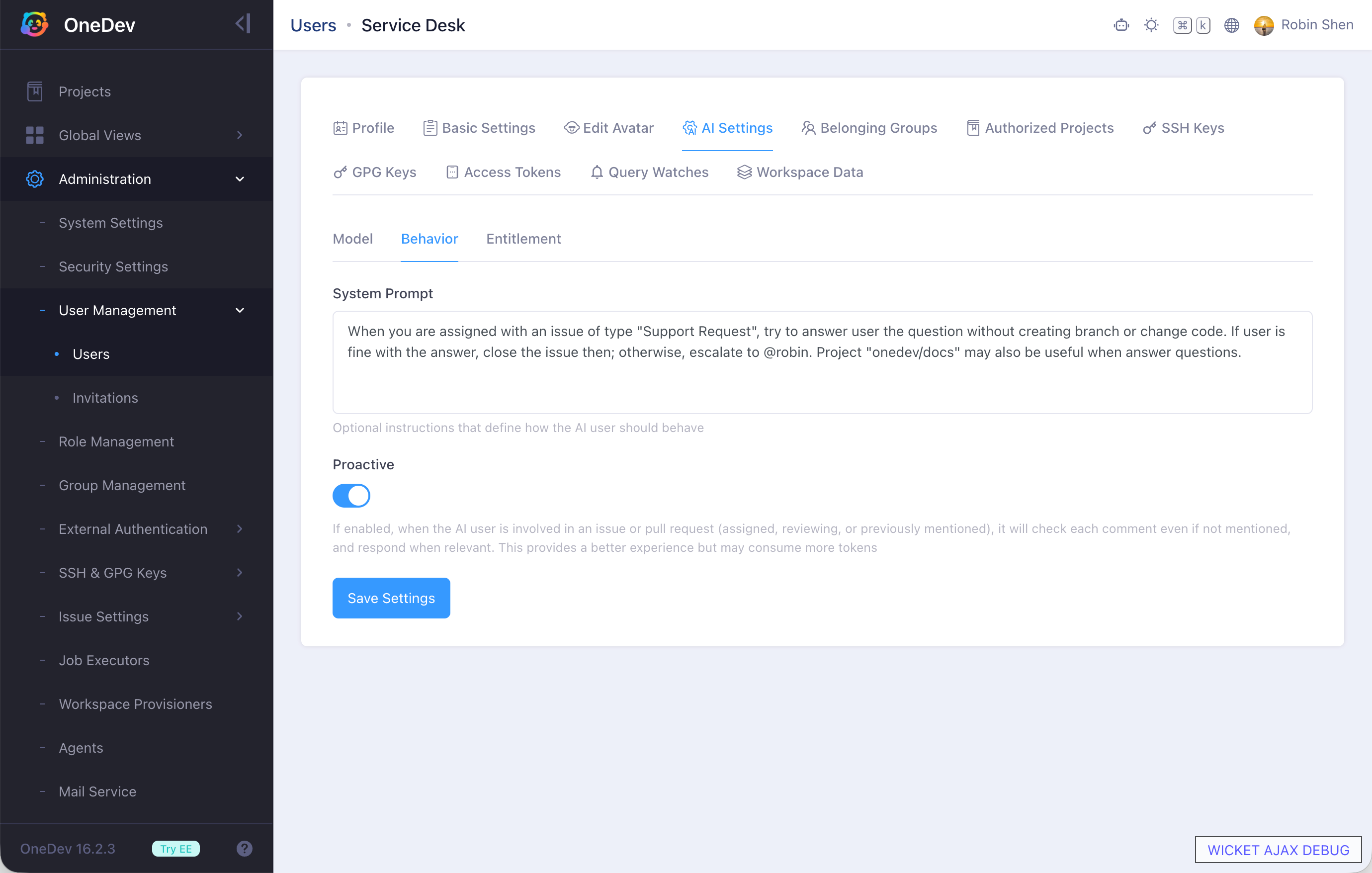
Two settings shape most of this behavior.
The system prompt defines the AI user's role. At code.onedev.io, where the default Support Request type has been renamed to Question, the service desk AI user is configured with this site-specific prompt:
When you are assigned an issue of type "Question", answer the question without
creating a branch or changing code. If the user is satisfied with the answer,
close the issue. Otherwise, escalate to @robin. The "onedev/docs" project may
also be useful when answering questions.
This prompt reflects how support is organized at code.onedev.io: it keeps the AI user focused on answering rather than implementing, and defines when to close the ticket, when to escalate, and where else to look for information.
The second setting is Proactive mode. Once involved in a ticket, every new comment invokes the AI user, even without an explicit mention. It reads the comment and replies when relevant, so the customer can continue naturally through either the issue page or its email thread.
Reading the Code: Accuracy Versus Exposure
Answering from code brings both a major benefit and a serious risk.
The benefit is accuracy. The code reflects what the software does, while documentation can lag behind. When the two disagree, an AI user reading the code can answer from the implementation rather than an outdated description.
The risk is exposure. For an open source project, the source is already public, so letting an AI user read it reveals nothing new. For a closed source project, a customer-facing agent with source access creates a genuine security risk.
You can instruct the AI user never to reveal code snippets, internal identifiers, or file paths, but a system prompt is only a soft boundary. A prompt-injection attack may persuade the agent to ignore those instructions.
Treat the system prompt as guidance, not a security control. Protect confidential information by limiting what the agent can access, not only by telling it what it may reveal.
A Clean Fit: Docs as Code
This approach is especially well suited to documentation that already lives in Git.
If your site uses Docusaurus, Hugo, MkDocs, or a similar tool, its documentation is stored as files in a repository. Point the service desk AI user at that repository, and it can inspect the same content you publish. There is no private source code for a prompt-injection attack to expose.
The result is a natural-language interface to your existing docs-as-code, available in OneDev issues and through the email channel your customers already use.
See It Live—and Set Up Your Own
This is not a staged workflow or a product mockup. The AI service desk is running today at code.onedev.io, where it handles real support questions in the OneDev project.
In OD-2885: Step by step guide to set up AI service desk, we asked how to build the service described in this post. The issue was assigned to the servicedesk AI user, which responded with its own practical setup guide:
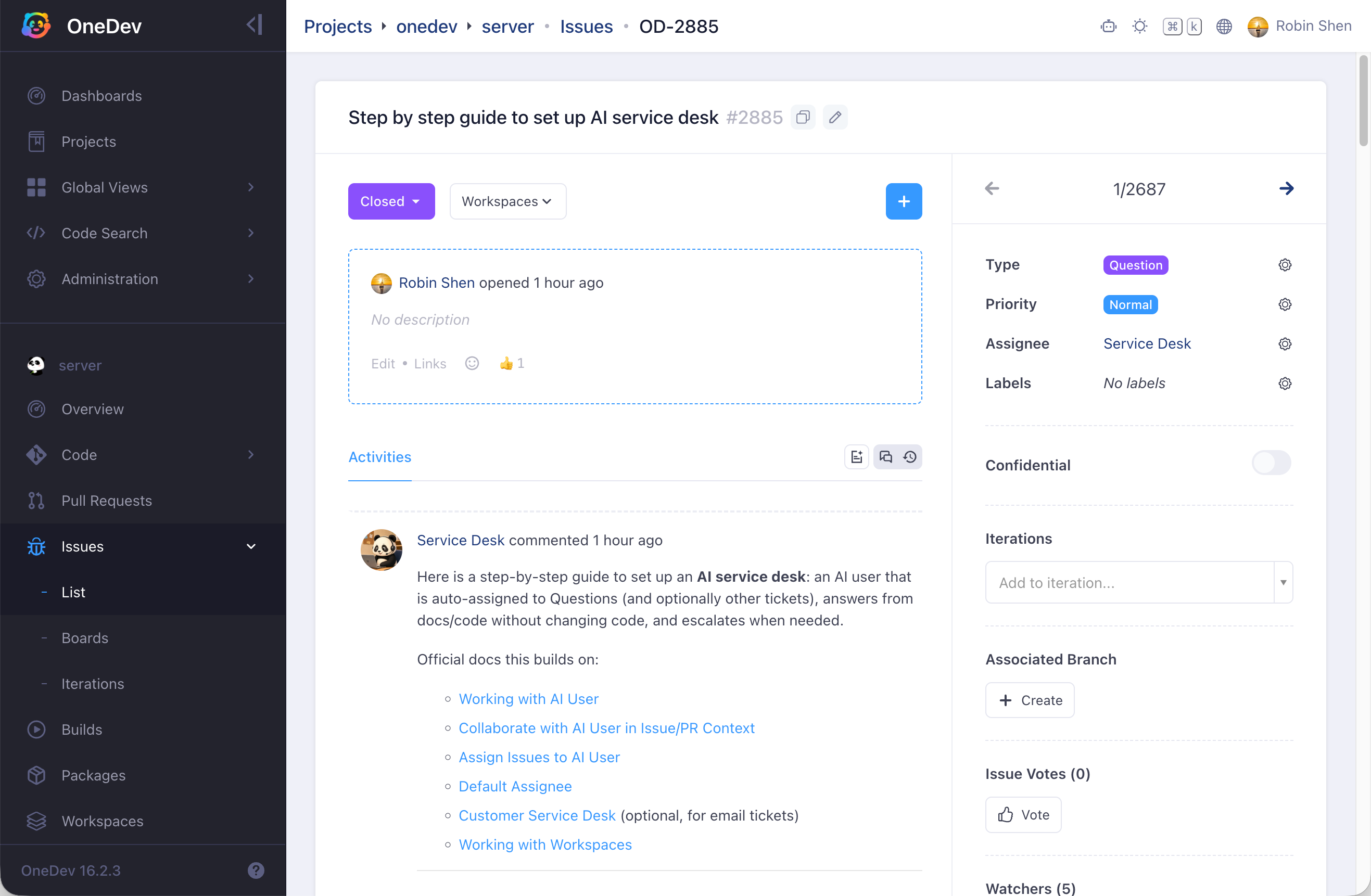
The answer covers the complete workflow:
- AI user: Create the user and define its support role.
- Permissions: Grant only the project access it needs.
- Workspace: Prepare an automated workspace spec.
- Credentials: Bootstrap the coding agent's credentials.
- Routing: Assign support requests with a default-assignee script.
- Email: Optionally accept tickets through the customer service desk.
- Operation: Run the service and handle escalation day to day.
Use the full answer in OD-2885 as the step-by-step guide for your own AI service desk.
The same issue also demonstrates the day-to-day support loop. A follow-up moved into a licensing detail, the user challenged the initial answer, and the AI service desk acknowledged the correction and brought in a human maintainer. Once the answer was confirmed, it relayed the result to the user. In one public thread, the service desk investigated, answered, corrected course, and escalated when human authority was required.
Once the AI user and customer service desk are configured, assign new support requests to the AI user directly or through a default-assignee script. Your codebase and documentation can then begin answering customer questions—with a human ready for the cases that need one.